Web Components
vitallens.js includes a suite of pre-built Custom Elements. These allow you to drop fully functional vitals scanning UIs into your application with a single HTML tag.
Setup
Ensure you have imported the browser bundle:
<script type="module" src="https://cdn.jsdelivr.net/npm/vitallens/dist/vitallens.browser.js"></script>
All components share the same core attributes for authentication:
| Attribute | Description |
|---|---|
api-key |
Your VitalLens API Key. |
proxy-url |
URL to your backend proxy (Alternative to api-key for production security). |
<vitallens-scan>

A self-contained wizard that guides the user through a fixed 30-second measurement process using their webcam. It handles face positioning, lighting checks, progress tracking, and displays the final aggregated results.
Best for: Health check-ins, onboarding flows, guided measurements.
<vitallens-monitor>

A continuous monitoring widget. It uses the webcam to display Heart Rate, Respiratory Rate, HRV values, and real-time waveforms on an ongoing basis. It automatically handles transient issues like face loss or poor lighting by instructing the user to adjust.
Best for: Dashboards, wellness training, continuous tracking.
<vitallens-file>

A file processing interface. It presents a simple start screen to prompt the user for a video file, handles the upload and processing state with a loading indicator, and displays the final extracted vitals and waveforms.
Best for: Asynchronous analysis, post-processing recorded videos, clinical reviews.
<vitallens-widget>
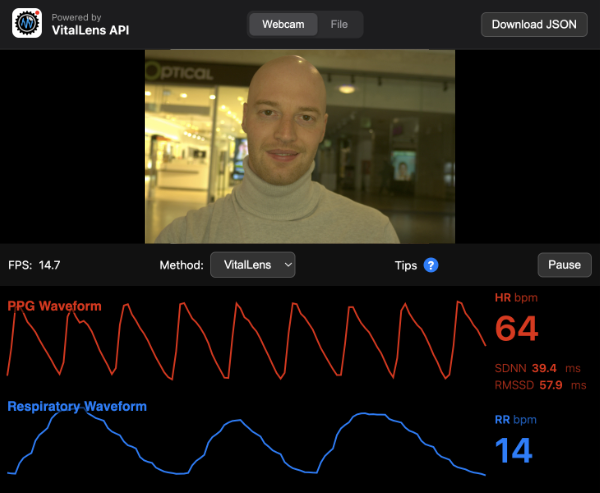
The advanced "Unified" widget. It provides a robust developer interface for switching between Webcam and File modes, selecting specific inference algorithms (VitalLens vs traditional rPPG methods like POS/G), and visualizing the raw data streams in real-time. It also includes an option to export the data as JSON.
Best for: Developer tools, data analysis, debugging, and testing configurations.